
Global Search lets you find content across both Preserve Operate and Preserve Learn from a single search bar, without knowing exactly where something lives.
How to open Search
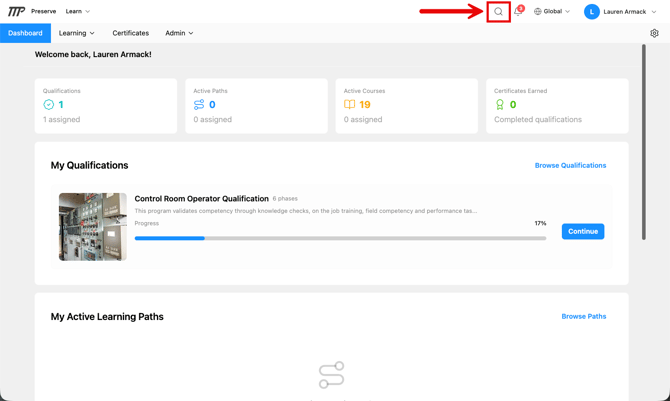
Click the magnifying glass icon in the navigation. This opens the search panel.
What Search covers
Global Search returns results from every Preserve product you have access to:
In Preserve Operate:
- Documents (by name, description, tags, system codes)
- Interactive Procedures
- Rounds
- Ops 360 pages
All Operate results are scoped to the sites you have access to, you won't see content from sites you haven't been given a role on.
In Preserve Learn:
- Published courses
- Learning paths
- Qualifications
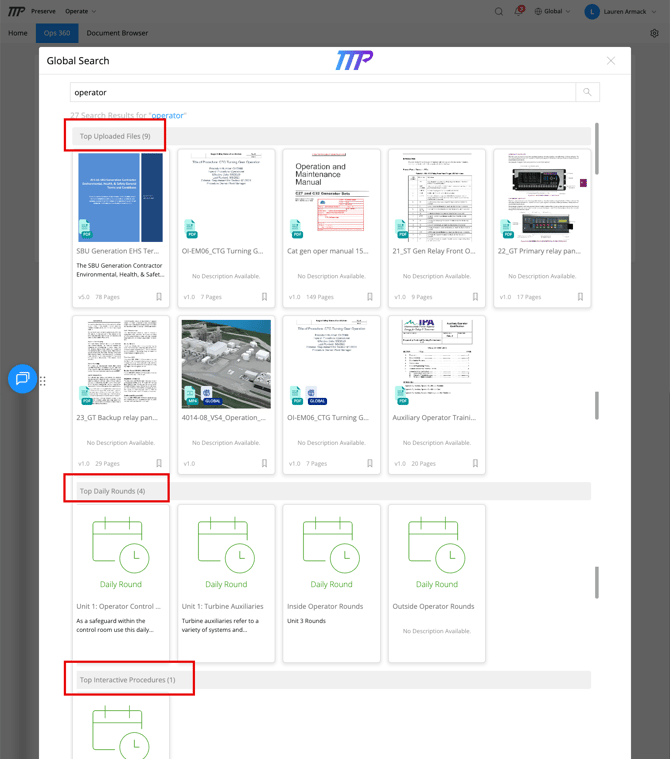
Learn results follow the site you have selected. With a site selected, you'll only see courses, learning paths, and qualifications that are visible at that site. In the Global view, you'll see results from across your organization.
Learning paths set to Private only appear in search for learners who are already enrolled in them. Managers and Learn Admins can still find them.
How Search works
Search uses prefix matching and stemming, which means partial words and related terms can return results. For example, searching "operat" may return results for "operating," "operation," and "operator."
Search is capped at 10 results per category, so if you're not finding what you're looking for, try a more specific term or navigate directly to the relevant section.
Tips
- Use descriptive words from the document or procedure name rather than vague terms
- Tags and system codes are searchable, if your team uses consistent tags and codes, searching by the term can help surface related content.
- If a result doesn't appear in search but you know it exists, check which site you have selected. Content that isn't visible at your current site won't appear, so try switching sites (or to the Global view, if you have it). If it still doesn't appear, check with your admin that you have the correct role and site access.