
All account changes are handled by your organization's Platform Admin.
What requires a Platform Admin?
- Changing your display name
- Resetting your password
- Updating your email address
- Changing your role in Operate or Learn
- Granting or removing access to a specific site
If any of these applies to you, reach out to your Platform Admin directly and ask them to make the change in Settings → Users.
Notification preferences
Preserve's in-app notification bell delivers real-time alerts for round completions, out-of-bounds readings, procedure submissions, task reviews, and other activity relevant to your role. These notifications are fixed — there is currently no way for individual users to configure or mute specific notification types. If you're receiving alerts that aren't relevant to your work, speak with your Platform Admin about whether your role assignment is correct.
Reporting a bug or sending feedback
If you encounter an issue in Preserve, you can report it directly from within the platform. Click your name in the navigation to open the account menu, then look under the Support section and click Report Bug. This sends your report directly to TTP.
The Support section in your account menu has three options:
- Documentation links to the Preserve help center, where you can search for answers
- Report Bug sends a bug report directly to TTP
- Feature Voting lets you propose new features, vote on others' ideas, and see what the community has been requesting. You get 5 votes to use across any open proposals, and you can retract them if you change your mind
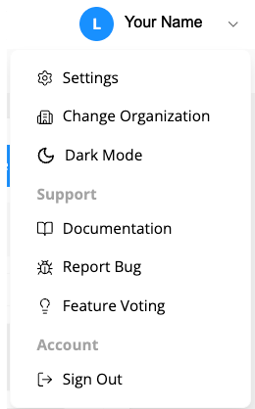
The same Support section also has a Documentation link — the Preserve help center — if you want to search for an answer first.