
A learning path is a set of courses that build on each other. Once you're enrolled in a path, you complete it by finishing every course in it. This article covers how to work through those courses and what happens when you're done.
Not enrolled yet? See Enrolling in Courses & Learning Paths.
Step 1: Open your learning path
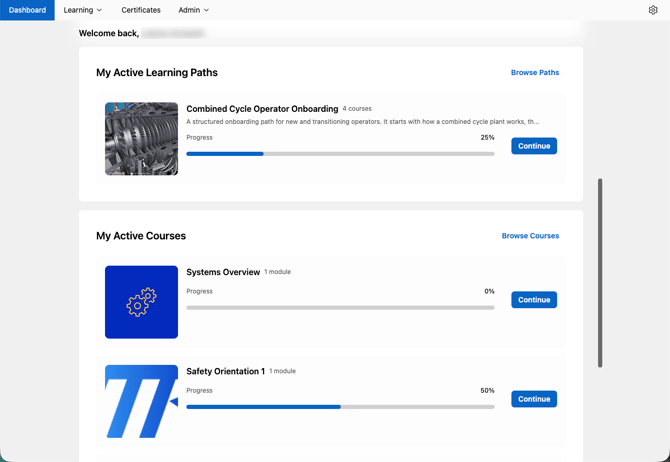
On your Learn dashboard, find the path under My Active Learning Paths and click Continue. You can also open Learning Paths in Learn and click the path you're enrolled in.
The path page lists every course in the path, in order, with your progress for each one.
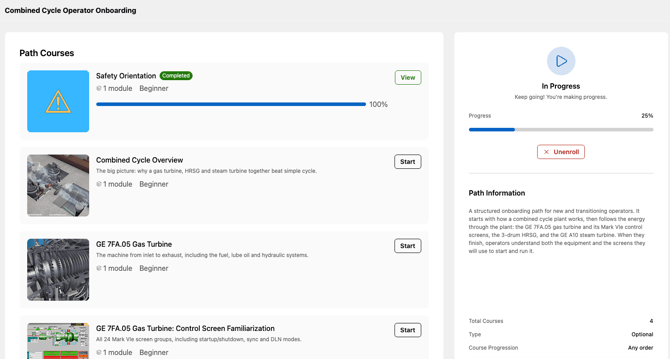
💡 A Mandatory badge means your organization has marked this path as required training. It doesn't change how you complete it.
Step 2: Start each course
Enrolling in a path doesn't enroll you in its courses. Each course is started separately.
- Click Start next to a course.
- If you aren't enrolled in that course yet, click Enroll Now.
- Work through the course as usual (see Completing a Course).
If you already started or finished a course on its own, your progress carries over. You won't need to repeat it.
Which course can you start?
That depends on how the path is set up:
- Any order: start any course in the path, in whatever order works for you. The order shown is the suggested one.
- Sequential: courses open one at a time. A course shows as Locked until you finish the one before it.
Step 3: Track your progress
Your progress percentage updates as you finish courses. You'll see it on the path page and on the My Active Learning Paths card on your dashboard.
To pick up where you left off, open the path and click Continue on the course you're working on.
Step 4: Finish the path
When every course in the path is complete, the path is marked complete. The path now shows Review instead of Continue, so you can go back to any course without enrolling again.
💡 Learning paths don't issue certificates. Certificates come from completing a qualification. If you're working toward a certificate, check whether your training is part of a qualification (see Completing a Qualification).
Keeping your path current
Some training repeats on a schedule, such as an annual refresher. If a course in your path is due again and isn't renewed in time, it lapses:
- The path shows Renewal Required with the number of courses that need renewing, and its progress drops.
- Retake the lapsed course to restore the path.
- If the path is part of a qualification, a lapsed course can also suspend that qualification's certificate until you retake it.